Lately I've been learning how to use an ESB that my company (Neudesic) created. I'm really liking it, it seems very intuitive and easy to use. It has a bit of overlap with BizTalk functionality, but I think that both of them together make a great team. I'm not very fond of the BizTalk ESB Toolkit, so I'm glad to find something I like better.
The product is called Neuron ESB. I don't have time to go into detail at the moment (deadlines, you know!), but I plan to write more later. You can click on the link for more details.
Monday, April 02, 2012


Tuesday, March 06, 2012
SQL - Split Using Common Table Expression
In working with SQL server, I have often needed to use a Split function, which will take a string and a delimiter, and return a table of tokens from the string. The only problem is that my clients have not always been happy about needing to add a function to the DB.
I have recently discovered Common Table Expressions (CTEs), thanks to the San Diego Tech Immersion Group. I found a CTE that I was able to modify to produce the table of tokens from a string, just like the function above. Here's my modified query with a test string:
But seriously, if it fails when testing the application I'm working on now, I'll modify this post.
I have recently discovered Common Table Expressions (CTEs), thanks to the San Diego Tech Immersion Group. I found a CTE that I was able to modify to produce the table of tokens from a string, just like the function above. Here's my modified query with a test string:
DECLARE @str AS NVARCHAR(MAX)I've tested this extensively for almost 2 minutes!
DECLARE @separator AS NVARCHAR(2)
SET @str = 'test1
test2
test3
test4'
SET @separator = CHAR(13) + CHAR(10)
;
WITH Split_CTE(rowNum, stringStart, stringEnd) AS
(
SELECT
1 AS rowNum,
CAST(1 AS BIGINT) AS stringStart,
CHARINDEX(@separator, @str) AS stringEnd
UNION ALL
SELECT
rowNum + 1 AS rowNum,
stringEnd + LEN(@separator) AS stringStart,
CHARINDEX(@separator, @str, stringEnd + 1) AS stringEnd
FROM Split_CTE
WHERE stringEnd > 0
)
SELECT
rowNum,
SUBSTRING(@str, stringStart,
CASE WHEN stringEnd > 0 THEN stringEnd - stringStart ELSE 2000000000 END) AS StringValue
FROM Split_CTE
;
But seriously, if it fails when testing the application I'm working on now, I'll modify this post.
Wednesday, August 10, 2011
Message - "The MSDTC transaction manager was unable to push the transaction..."
A client recently saw a strange error after installing a new BizTalk 2010 application. The app produced the following error when using the WCF SQL adapter to connect to a remote SQL database:
The adapter failed to transmit message going to send port "RequestMessageData" with URL "mssql://VSQL05.PROD.acme.com//Messages?". It will be retransmitted after the retry interval specified for this Send Port. Details:"System.Transactions.TransactionManagerCommunicationException: Communication with the underlying transaction manager has failed. ---> System.Runtime.InteropServices.COMException: The MSDTC transaction manager was unable to push the transaction to the destination transaction manager due to communication problems. Possible causes are: a firewall is present and it doesn't have an exception for the MSDTC process, the two machines cannot find each other by their NetBIOS names, or the support for network transactions is not enabled for one of the two transaction managers. (Exception from HRESULT: 0x8004D02A)
At first I thought the error might have to do with the fact that the SQL address is virtual. But after some flopping about like a fish on deck, we found a guy at the client site who knew MSDTC really well. He suggested that we choose the "Enable XA Transactions" option in the DTC properties dialog box. I didn't know it at the time, but the production DB was in SQL 2000, running on an older version of Windows. The QA DB had been SQL 2005.
That fix didn't work by itself (there was another issue), and then I remembered that I once ran into something like this when installing BizTalk 2004 for another client. In that case, I had to select "No Authentication Required" in the MSDTC properties on all boxes. But since I knew that no request was going to be coming from SQL 2000, I selected "Incoming Caller Authentication Required". Problem solved!
The adapter failed to transmit message going to send port "RequestMessageData" with URL "mssql://VSQL05.PROD.acme.com//Messages?". It will be retransmitted after the retry interval specified for this Send Port. Details:"System.Transactions.TransactionManagerCommunicationException: Communication with the underlying transaction manager has failed. ---> System.Runtime.InteropServices.COMException: The MSDTC transaction manager was unable to push the transaction to the destination transaction manager due to communication problems. Possible causes are: a firewall is present and it doesn't have an exception for the MSDTC process, the two machines cannot find each other by their NetBIOS names, or the support for network transactions is not enabled for one of the two transaction managers. (Exception from HRESULT: 0x8004D02A)
At first I thought the error might have to do with the fact that the SQL address is virtual. But after some flopping about like a fish on deck, we found a guy at the client site who knew MSDTC really well. He suggested that we choose the "Enable XA Transactions" option in the DTC properties dialog box. I didn't know it at the time, but the production DB was in SQL 2000, running on an older version of Windows. The QA DB had been SQL 2005.
That fix didn't work by itself (there was another issue), and then I remembered that I once ran into something like this when installing BizTalk 2004 for another client. In that case, I had to select "No Authentication Required" in the MSDTC properties on all boxes. But since I knew that no request was going to be coming from SQL 2000, I selected "Incoming Caller Authentication Required". Problem solved!
Tuesday, August 02, 2011
BizTalk Map - Copy Node containing HTML
I recently had to map data from an InfoPath 2007 form to a canonical schema. The input from InfoPath usually contained HTML, although on occasion it contained encoded HTML (depending on where the original data was pulled from). The output needed to be in a CDATA section so that it could be treated as plain old text.
After consulting several people at work and looking at lots of blog posts, I was able to pull off a solution. I'm sure there are ways to improve the quality of the code, but it does work. One thing I don't like about this solution is that it adds a namespace attribute to the top level HTML nodes. Fortunately every browser I tested with ignores the namespace.
Here's the source schema:
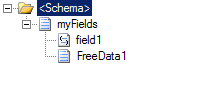
And here's the contents of the Inline XSLT functoid that I used:
<xsl:element name="ns0:FreeformData1" >
<xsl:text disable-output-escaping="yes"><![CDATA[</xsl:text>
<xsl:choose>
<xsl:when test="count(/*[local-name()='myFields']/*[local-name()='FreeData1']/child::*/child::node()) > 0">
<xsl:for-each select = "/*[local-name()='myFields']/*[local-name()='FreeData1']/child::node()">
<xsl:copy-of select="self::*" />
</xsl:for-each>
</xsl:when>
<xsl:otherwise>
<xsl:value-of select="string(/*[local-name()='myFields']/*[local-name()='FreeData1'])" disable-output-escaping="yes"/>
</xsl:otherwise>
</xsl:choose>
<xsl:text disable-output-escaping="yes">]]></xsl:text>
</xsl:element>
If the input XML looks like this:
<ns0:myFields xmlns:ns0="http://sampleforblog.namespace.com">
<ns0:field1>Test data</ns0:field1>
<ns0:FreeData1><html><FONT color="#ff0000">Hello</FONT> world this <STRONG>is a test</STRONG></html></ns0:FreeData1>
</ns0:myFields>
Then the output XML looks like this:
<ns0:yourFields xmlns:ns0="http://sample2forblog">
<ns0:field>Test data</ns0:field>
<ns0:FreeformData1><![CDATA[<html xmlns:ns0="http://sampleforblog.namespace.com"><FONT color="#ff0000">Hello</FONT> world this <STRONG>is a test</STRONG></html>]]></ns0:FreeformData1>
</ns0:yourFields>
I'm not showing the case where the HTML is encoded, but I did test that as well. Encoded HTML is handled by the "otherwise" case in the XSLT above.
After consulting several people at work and looking at lots of blog posts, I was able to pull off a solution. I'm sure there are ways to improve the quality of the code, but it does work. One thing I don't like about this solution is that it adds a namespace attribute to the top level HTML nodes. Fortunately every browser I tested with ignores the namespace.
Here's the source schema:

And here's the contents of the Inline XSLT functoid that I used:
<xsl:element name="ns0:FreeformData1" >
<xsl:text disable-output-escaping="yes"><![CDATA[</xsl:text>
<xsl:choose>
<xsl:when test="count(/*[local-name()='myFields']/*[local-name()='FreeData1']/child::*/child::node()) > 0">
<xsl:for-each select = "/*[local-name()='myFields']/*[local-name()='FreeData1']/child::node()">
<xsl:copy-of select="self::*" />
</xsl:for-each>
</xsl:when>
<xsl:otherwise>
<xsl:value-of select="string(/*[local-name()='myFields']/*[local-name()='FreeData1'])" disable-output-escaping="yes"/>
</xsl:otherwise>
</xsl:choose>
<xsl:text disable-output-escaping="yes">]]></xsl:text>
</xsl:element>
If the input XML looks like this:
<ns0:myFields xmlns:ns0="http://sampleforblog.namespace.com">
<ns0:field1>Test data</ns0:field1>
<ns0:FreeData1><html><FONT color="#ff0000">Hello</FONT> world this <STRONG>is a test</STRONG></html></ns0:FreeData1>
</ns0:myFields>
Then the output XML looks like this:
<ns0:yourFields xmlns:ns0="http://sample2forblog">
<ns0:field>Test data</ns0:field>
<ns0:FreeformData1><![CDATA[<html xmlns:ns0="http://sampleforblog.namespace.com"><FONT color="#ff0000">Hello</FONT> world this <STRONG>is a test</STRONG></html>]]></ns0:FreeformData1>
</ns0:yourFields>
I'm not showing the case where the HTML is encoded, but I did test that as well. Encoded HTML is handled by the "otherwise" case in the XSLT above.
Friday, July 29, 2011
SharePoint - Counting Social Tags
I found some code on the web for counting social tags, but unfortunately it failed when the page was a "welcome" page. The code below handles that special case. I used a Web Service Reference to the SocialDataService web service, although I probably could have created a (WCF) Service Reference instead.
The method IsWelcomePage() is detailed in my previous post. The method TrimPageFromUrl() is fairly simple, it just changes a URL such as http://spsite/pages/default.aspx to http://spsite/.
The method IsWelcomePage() is detailed in my previous post. The method TrimPageFromUrl() is fairly simple, it just changes a URL such as http://spsite/pages/default.aspx to http://spsite/.
private void CountTagsByTermNameAndUrl()
{
    using (SocDataSvc.SocialDataService socialDataService = new SocDataSvc.SocialDataService())
    {
        socialDataService.Credentials = System.Net.CredentialCache.DefaultNetworkCredentials;
        socialDataService.Url = GetUrlWithUpdatedDomain(socialDataService.Url, m_siteUrl);
        SocDataSvc.SocialTermDetail termDetail;
        try
        {
            termDetail = socialDataService.GetTagTermsOnUrl(m_siteUrl, null)
                .Where(detail => detail.Term.Name == m_termName).SingleOrDefault();
            if (termDetail == null && IsWelcomePage(m_siteUrl))
            {   // this could be the default page, remove the last part of the Url and try again
                m_siteUrl = TrimPageFromUrl(m_siteUrl);
                termDetail = socialDataService.GetTagTermsOnUrl(m_siteUrl, null)
                    .Where(detail => detail.Term.Name == m_termName).SingleOrDefault();
            }
        }
        catch (Exception ex)
        {
            // handle exception
        }

        // make sure we got at least one result
        m_tagCount = (termDetail != null && termDetail.Term.Name == m_termName) ? termDetail.Count : 0;
    }
}
Getting the Welcome Page for a SharePoint Publishing Site
I wish I had found this sooner, it could have saved me a lot of time:
private static bool IsWelcomePage(string url)
{
    bool rslt = false;

    using (SPSite site = new SPSite(url))
    {
        using (SPWeb web = site.OpenWeb())
        {
            if (PublishingWeb.IsPublishingWeb(web))
            {
                PublishingWeb pweb = PublishingWeb.GetPublishingWeb(web);
                string defaulturl = pweb.DefaultPage.Url;

                if (defaulturl == new Uri(url).GetComponents(UriComponents.Path, UriFormat.SafeUnescaped))
                {
                    rslt = true;
                }
            }
        }
    }

    return rslt;
}
Properties for SharePoint 2010 Visual Web Parts
I seem to spend a lot of time looking up where to set various properties in Visual Web Part projects, so I'm recording what I have learned recently. Here's how to set the Category that the web part will appear in when adding it to a page:
<Property Name="Group" Value="Acme" />
This property is in the Elements.xml file for the web part. In this case, the Category will be Acme.
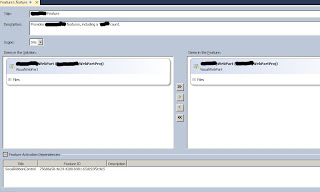
Here's a picture of some things that affect the appearance of this feature in SharePoint under Manage Features. Title and description should be fairly obvious. The interesting thing about this feature is that it has a dependency on another feature called Social Ribbon. I found the GUID by looking in the TEMPLATE\FEATURES folder in the 14 hive. In my case, I opened the Feature.xml file in the SocialRibbonControl folder and copied the Feature Id value.
I also wanted show an image in the feature gallery next to the feature. First, I right clicked my project name in VS Solution Explorer and selected Add / SharePoint "Images" mapped folder. I created a sub-folder directly in the Images folder and copied my image there. Finally, I edited the Feature1.Template.xml file and added the following attribute to the Feature element: ImageUrl="Neudesic\Neudesic.jpg".
Finally, here are some properties that I added to the .webpart file: to affect the display of the web part in the web part gallery and to set a couple of properties that take effect when the web part displays on a page:
<property name="Title" type="string">Acme Web Part</property>
<property name="Description" type="string">Displays stuff, along with doing other stuff"</property>
<property name="ChromeType" type="chrometype">None</property>
<property name="Width" type="unit">200</property>
<Property Name="Group" Value="Acme" />
This property is in the Elements.xml file for the web part. In this case, the Category will be Acme.
Here's a picture of some things that affect the appearance of this feature in SharePoint under Manage Features. Title and description should be fairly obvious. The interesting thing about this feature is that it has a dependency on another feature called Social Ribbon. I found the GUID by looking in the TEMPLATE\FEATURES folder in the 14 hive. In my case, I opened the Feature.xml file in the SocialRibbonControl folder and copied the Feature Id value.

I also wanted show an image in the feature gallery next to the feature. First, I right clicked my project name in VS Solution Explorer and selected Add / SharePoint "Images" mapped folder. I created a sub-folder directly in the Images folder and copied my image there. Finally, I edited the Feature1.Template.xml file and added the following attribute to the Feature element: ImageUrl="Neudesic\Neudesic.jpg".
Finally, here are some properties that I added to the .webpart file: to affect the display of the web part in the web part gallery and to set a couple of properties that take effect when the web part displays on a page:
<property name="Title" type="string">Acme Web Part</property>
<property name="Description" type="string">Displays stuff, along with doing other stuff"</property>
<property name="ChromeType" type="chrometype">None</property>
<property name="Width" type="unit">200</property>
Subscribe to:
Posts (Atom)