Friday, February 04, 2011

SSR Report Fun

I was working on an SSRS Report recently that needed to select a bunch of, shall we say, Widgets, and the filter criterion was to select one or more Widget Managers. Each widget manager ID is a GUID. Fairly easy to do in SSRS. Here's the basic query:

SELECT * FROM Widget W
WHERE WM.WidgetManagerId IN (@WidgetManagers)

And here's the query to select the Widget Managers:

SELECT FirstName + ' ' + LastName AS WidgetManagerName, WidgetManagerId
FROM WidgetManager
ORDER BY WidgetManagerName

Here's what the parameter definition looks like:


This works okay, but for my purposes there were 2 issues. First of all, my client wanted all items to be selected by default. That's an easy problem to handle, all I need to do is to set the Default values for the WidgetManagers report parameter to the same dataset I use for Available values.

Unfortunately, that query ran really slowly. When I looked at the query using SQL Profiler, it looked like this:

SELECT * FROM Widget W
INNER JOIN WidgetManager WM ON
W.WidgetManagerId = WM.WidgetManagerId
WHERE WM.WidgetManagerId IN
(N'0fa07056-8e50-43a0-b72d-000a68d17be1',
N'8eff8f59-ca6a-4eed-a434-016a8831c7ec',
N'2a3a885e-8fb2-4e8b-b55a-02a7225a1143',
...)

I only showed 3 of the GUIDS, but the query sent to SQL had all 1000+ of them inline in the query. No wonder it was slow.

I'll skip to the final solution. I changed the query for the Widget Managers to look like this:

SELECT 'All Widget Managers' AS WidgetManagerName,
'00000000-0000-0000-0000-000000000000' AS WidgetManagerId, 1 AS OrderBy
UNION
SELECT FirstName + ' ' + LastName AS WidgetManagerName,
WidgetManagerId, 2 AS OrderBy
FROM WidgetManager
ORDER BY OrderBy, WidgetManagerName

Then I changed the query for the Widgets themselves to look like this:

DECLARE @WidgetManagerCount AS INT
SET @WidgetManagerCount = (SELECT COUNT(*) FROM WidgetManager
WHERE WidgetManagerId IN (@WidgetManagers))

SELECT * FROM Widget W
WHERE
(1 =
CASE
WHEN @WidgetManagerCount = 0 THEN 1
ELSE
CASE
WHEN W.WidgetManagerId IN (@WidgetManagers) THEN 1
ELSE 0
END
END)

And finally, I changed the report parameter to look like this:
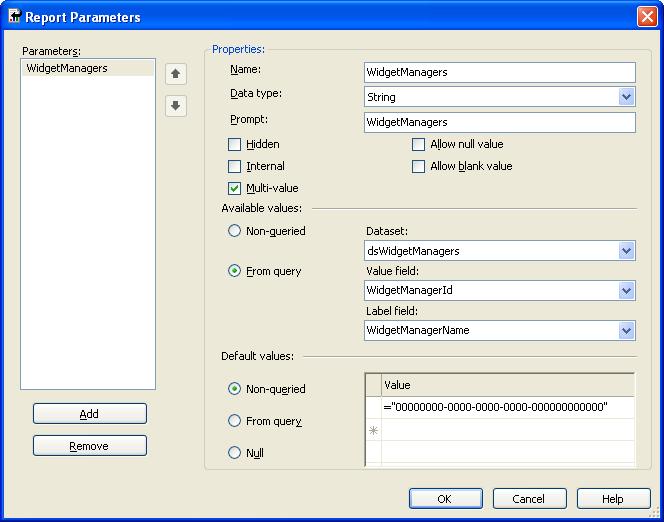

The basic idea is that when the report first comes up, "All Widget Managers" is chosen, and all other Widget Managers are unchecked. When the Widget query runs, @WidgetManagerCount will be set to 0, and only the top part of the outer case statement will be evaluated, and all Widgets will display on the report.

If any other Widget Managers are checked, @WidgetManagerCount will then be greater than zero, which will cause the inner case statement to be evaluated for each Widget. If a Widget Manager has been checked, all related Widgets will be displayed on the report.

This version of the report ran much, much faster than the original. What I'm showing above is a stripped down version of the report, but the real one had 4 filter criteria, and a couple of those filter criteria had thousands of choices.

Monday, December 20, 2010

SSRS Report #Error

Often when I go to add a field to an SSRS Report, I see #Error when I first try to display the field. The solution is simple, I just forgot to add .Value to the end of the expression for the field.

I normally wouldn't consider something so insignificant to be blog-worthy, but today I spent about a while trying to figure it out before a co-worker reminded me. I'm putting it here so I can find it in the future! Hopefully it will help someone else.

I discovered today that a search for SSRS Report #Error doesn't bring up much that's helpful, I found a few links that mentioned "divide by zero" issues.

Friday, September 10, 2010

Nailed by BizTalk

I got nailed by what seems to be a BizTalk bug yesterday. I found a resolution on Victor Fehlberg's blog. Thanks, Victor! The issue occurs when deploying an MSI that has a map that uses an external assembly. If the map was created when the external assembly was compiled with Debug configuration, the map won't be able to find the assembly compiled with the Release configuration.

Victor's issue was slightly different, so here is the (very ambiguous) error message that I saw. I'm including it here to make it easy to search with Google, and so that I can find this in the future:

Event Type: Error
Event Source: BizTalk Server 2006
Event Category: BizTalk Server 2006
Event ID: 5753
Date: 9/9/2010
Time: 5:00:37 PM
User: N/A
Computer: ACMEDEV1
Description:
A message received by adapter "FILE" on receive location "Rloc_Recs_FF"
with URI "C:\acme-inbound\ACME_CT\Inbound Flat File\*.*" is suspended.
Error details: The system cannot find the file specified. (Exception from HRESULT:
0x80070002)
MessageId: {5AFADD6F-6C98-4818-8554-13B17D0B22E9}
InstanceID: {99470432-7526-4CB1-8FC0-7ECDA8C2F08E}

For more information, see Help and Support Center at http://go.microsoft.com/fwlink/events.asp.

I resolved the issue by opening the map in my text editor and replacing all instances of "\obj\Debug\" with "\obj\Release\"

Friday, August 20, 2010

Using Notepad after Schema Changes

Often I want to make changes to a schema that I'm using in BizTalk. Typically I will change a node name (or two), or I'll change the namespace.

That will break any maps that reference the schema, and I'll sometimes get error messages if I compile an orchestration that uses the schema. Even worse, if I have some xpath expression in an orchestration, I may not figure that out that it's broken until run time.

I end up using a simple text editor like notepad to edit the map file(s) and orchestration file(s) directly, so I won't have to track down all of the usages of the changed node (or namespace) in the schema. I can just use simple search and replace (although I do check each replace instance before I actually do it). I don't work much with other BizTalk people these days, so I don't know if my approach is common...

Tuesday, August 10, 2010

BizTalk Error "...is an invalid XPath expression..." when using Table Looping functoid

I was building a BizTalk map today that uses a Table Looping functoid. It's been a while since I have used that functoid, and I thought I had everything setup fairly well. I went to test the map, and here's an error that I saw. The names have been changed to protect the innocent:
C:\dev\Acme Development\BizTalk\Code\Acme.Customer\Acme.Customer.Maps\TestCases_FF_to_TestCase.btm: 
error btm1050: XSL transform error: Unable to write output instance to the following
. XSLT compile error at (55,45). See InnerException for details.
'userCSharp:ConvertToXsDateTime(string($var:))' is an invalid XPath expression.
userCSharp:ConvertToXsDateTime(string($var:))' has an invalid qualified name.

ConvertToXsDateTime() is a function that I put inside of a scripting functoid, and one of the Table Extractor functoids feeds into it.

The issue was that I forgot to drag the output of the Table Looping functoid directly to the node I want to repeat. The output of the Table Looping functoid tells the map how many of the destination node it should produce.

I figured this out by changing the output of the Table Extractor functoids to feed directly into the destination field (instead of into my Scripting functoid), and observing that running the test didn't produce any useful output.

I want to record this here in my blog, since I've seen this error before, and I likely will again.

Thursday, July 29, 2010

System.MissingMethodException was unhandled

I have been creating a "string array" for use in a BizTalk orchestration. My first version was quick and dirty, and I didn't implement the IEnumerator interface.

Later, I decided to implement IEnumerator (and IEnumerable) so that it would be more recognizable to the next person reading my code. Everything compiled and a test program started, but the above exception was thrown when the client tried to call the Reset() method.

One thing that I didn't realize was related was that the debugger wouldn't step into my code. I saw the message below when I tried to do that:

---------------------------
Microsoft Visual Studio
---------------------------
The following module was built either with optimizations enabled or without debug information:

C:\WINDOWS\assembly\GAC_MSIL\AtlasReo.BizTalk.Utils\1.0.0.0__799aa29801fe6d60\AtlasReo.BizTalk.Utils.dll

To debug this module, change its project build configuration to Debug mode. To
suppress this message, disable the 'Warn if no user code on launch' debugger option.
---------------------------
OK
---------------------------

As many people reading this have probably figured out by now, I had an older version of my string array class in the GAC. Oops.

Pulling the assembly out of the GAC solved the first issue, and then I could also run the debugger on the assembly code.

Wednesday, July 28, 2010

BizTalk "Errors exist for one or more children."

I used to see the error "Errors exist for one or more children." a lot in BizTalk 2004 when I was creating an orchestration. The error wasn't valid, because I could usually get rid of it by saving and then deleting code from an Expression shape, then compiling, then copying the code back, and compiling again.

I had not yet encountered this issue with BizTalk 2006 until today. This time the error was tagged to my Loop shape. I was able to fix the error by deleting the code from an Expression shape inside of the loop, and proceeding as I describe above. I'm just glad that I didn't have a large number of expression shapes inside of my Loop, because there was no way for me to identify which Expression was causing the error.