I used to see the error "Errors exist for one or more children." a lot in BizTalk 2004 when I was creating an orchestration. The error wasn't valid, because I could usually get rid of it by saving and then deleting code from an Expression shape, then compiling, then copying the code back, and compiling again.
I had not yet encountered this issue with BizTalk 2006 until today. This time the error was tagged to my Loop shape. I was able to fix the error by deleting the code from an Expression shape inside of the loop, and proceeding as I describe above. I'm just glad that I didn't have a large number of expression shapes inside of my Loop, because there was no way for me to identify which Expression was causing the error.
Wednesday, July 28, 2010


Tuesday, July 27, 2010
BizTalk 2006 Envelopes
I've been working on a BizTalk 2006 project lately. I was pleasantly surprised to find out that using an envelope schema for debatching is easier than I remembered from when I worked with 2004.
In my case, I had a schema whose records looked something like this:
<root>
<header>child elements omitted!</header>
<body>child elements omitted!</body>
</root>
All I did was to create 3 schemas, one for the envelope, and one each for the header and the body. The envelope schema had the Envelope property of the Schema node set to "Yes", and the Body Xpath property of the "root" node set to:
/*[local-name()='root' and namespace-uri()='']
I created the schemas for the header and the body directly from samples I made by cutting and pasting from the large message.
I then deployed the schemas, set up a receive port / location, and 2 send ports with filters to grab the messages based on the receive port and the message type. Here are the results:

I remember this being more difficult in BTS 2004, I think I created a pipeline component to make this work. I'd like to test this out, but I don't currently have access to a BTS 2004 installation.
Thursday, April 29, 2010
Microsoft Enterprise Library Caching Gotcha
Recently, a developer where I work added caching to some methods that retrieve contacts from a table in our database. Afterwords, a tester complained that when he went to one screen that allows selecting a contact, he saw the text "[Select a contact]" repeated. Not only that, every time he returned to that screen, the problem became worse.
Before caching was added, the method that retrieves the list of contacts got them from the database, then it added the text "[Select a contact]" to the beginning of the list. When caching was added, the list was retrieved from the cache (if available), and then the text "[Select a contact]" was added to the beginning.
It turns out that when a list is added to the cache, and then later the list is modified, that modified list will be returned the next time the cache is accessed. Here is some sample code to make it more clear:
I was surprised by the outcome. I thought that the list would be persisted only when cache.Add() is called, apparently that's not the case.
Before caching was added, the method that retrieves the list of contacts got them from the database, then it added the text "[Select a contact]" to the beginning of the list. When caching was added, the list was retrieved from the cache (if available), and then the text "[Select a contact]" was added to the beginning.
It turns out that when a list is added to the cache, and then later the list is modified, that modified list will be returned the next time the cache is accessed. Here is some sample code to make it more clear:
I added a counter to make it slightly more clear what's happening. Here's the output from Visual Studio:
private void btnTestCaching_Click(object sender, EventArgs e)
{
  List<string> testList = TestCaching(1);
  PrintList(testList);
  testList = TestCaching(2);
  PrintList(testList);
}

private void PrintList(List<string> testList)
{
  foreach (string s in testList)
  {
      Debug.WriteLine(s);
  }
}

private List<string> TestCaching(int id)
{
  ICacheManager cache = CacheFactory.GetCacheManager();
  List<string> testList = cache["TestList"] as List<string>;
  if (testList == null)
  {
      testList = new List<string>();
      testList.Add("Test 1");
      testList.Add("Test 2");
      testList.Add("Test 3");

      AbsoluteTime expiry = new AbsoluteTime(new TimeSpan(2, 0, 0, 0));
      cache.Add("TestList", testList, CacheItemPriority.High, null, new ICacheItemExpiration[] { expiry });
  }
  testList.Add("[Select a contact] " + id.ToString());
  return testList;
}
Test 1
Test 2
Test 3
[Select a contact] 1
Test 1
Test 2
Test 3
[Select a contact] 1
[Select a contact] 2
I was surprised by the outcome. I thought that the list would be persisted only when cache.Add() is called, apparently that's not the case.
Thursday, April 15, 2010
Viewing GAC Assemblies in an Explorer Window
I saw a neat trick somewhere on the internet...at the moment I can't find the original source. I like to give attributions where possible, but oh well.
As many developers probably know, it's possible to navigate to the GAC by using the command line to go to C:\Windows\Assembly (this is on Windows Server 2003).
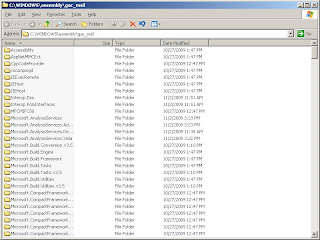
However, it's also possible to get Explorer to show items in the GAC. All of the assemblies I have created with Visual Studio end up in the GAC_MSIL folder. I can take the following steps to view them: click Start / Run, then key in "%SYSTEMROOT%\assembly\gac_msil", and click OK.
An Explorer window will pop up showing all of the assemblies in that part of the GAC:
Why would you want to do this? This trick allows you to debug a DLL directly from the GAC. You can now navigate to the exact location of the DLL, and then drop the .PDB in the same folder. If you then have the project for the DLL open in Visual Studio, you can attach to the process calling your DLL and set breakpoints, etc.
This doesn't always work smoothly, but there are some situations where it was the only way to get the job done. In particular, if the client for the DLL is a program like BizTalk or SharePoint, it's the only way I could debug the DLL.
I have encountered at least one time when I had to reboot to be able to set breakpoints, but it beat the hell out of my alternatives.
Remember to remove the PDB from the GAC before you try to UN-install your DLL.
As many developers probably know, it's possible to navigate to the GAC by using the command line to go to C:\Windows\Assembly (this is on Windows Server 2003).
However, it's also possible to get Explorer to show items in the GAC. All of the assemblies I have created with Visual Studio end up in the GAC_MSIL folder. I can take the following steps to view them: click Start / Run, then key in "%SYSTEMROOT%\assembly\gac_msil", and click OK.
An Explorer window will pop up showing all of the assemblies in that part of the GAC:

Why would you want to do this? This trick allows you to debug a DLL directly from the GAC. You can now navigate to the exact location of the DLL, and then drop the .PDB in the same folder. If you then have the project for the DLL open in Visual Studio, you can attach to the process calling your DLL and set breakpoints, etc.
This doesn't always work smoothly, but there are some situations where it was the only way to get the job done. In particular, if the client for the DLL is a program like BizTalk or SharePoint, it's the only way I could debug the DLL.
I have encountered at least one time when I had to reboot to be able to set breakpoints, but it beat the hell out of my alternatives.
Remember to remove the PDB from the GAC before you try to UN-install your DLL.
Thursday, February 11, 2010
T-SQL UPDATE with FROM
I'm putting the following query here where I can find it again...it basically shows how the T-SQL "UPDATE" statement works with the FROM option. It's from a response to an old newsgroup post of mine -- thanks to David Pendleton!
UPDATE dest
SET accountNumber = src.ACCT
FROM Vendor dest
INNER JOIN zCustomer src on dest.[name] = src.CUNA
UPDATE dest
SET accountNumber = src.ACCT
FROM Vendor dest
INNER JOIN zCustomer src on dest.[name] = src.CUNA
Monday, April 27, 2009
Today I was working with a pipeline component which encrypted fields in an XML message, for sensitive information. I realized that I needed to use it with a Flat File disassembler, which means that the original message was not XML, so I had to put my component after the Flat File disassembler. For various reasons, I wanted to use my component no later than the Dissasembler stage for this scenario.
So first, I added IDisassemblerComponent to the list of interfaces being implemented in my pipeline component class.
Then, I added the following code:
This will only work if the previous disassembler is supposed to produce one message.
4/29/2010 - Changed the code to reflect changes suggested by Johan Rex...
So first, I added IDisassemblerComponent to the list of interfaces being implemented in my pipeline component class.
Then, I added the following code:
      private bool beginMessage = false;
      private IPipelineContext pContext;
      private IBaseMessage pInMsg;

      void IDisassemblerComponent.Disassemble(IPipelineContext pContext, IBaseMessage pInMsg)
      {
          beginMessage = true;
          this.pContext = pContext;
          this.pInMsg = pInMsg;
      }

      IBaseMessage IDisassemblerComponent.GetNext(IPipelineContext pContext)
      {
          if (beginMessage)
          {
              beginMessage = false;
              return Execute(pContext, pInMsg);
          }
          else
          {
              return null;
          }
      }
This will only work if the previous disassembler is supposed to produce one message.
4/29/2010 - Changed the code to reflect changes suggested by Johan Rex...
Wednesday, October 29, 2008
Find a Specific Value Anywhere in a SQL Server Database
I can't tell you how often in the past I could have used this script from David Yardy:
http://blog.davidyardy.com/archive/2008/08/16/sql-server-ndash-find-field-value-in-database.aspx
I can find a string value anywhere it exists in a field in my database. As he says, it can easily be modified to search for values that are not strings.
http://blog.davidyardy.com/archive/2008/08/16/sql-server-ndash-find-field-value-in-database.aspx
I can find a string value anywhere it exists in a field in my database. As he says, it can easily be modified to search for values that are not strings.
Subscribe to:
Posts (Atom)